Россия, Санкт-Петербург


СДЕЛАЙТЕ СВОИ УРОКИ ЕЩЁ ЭФФЕКТИВНЕЕ, А ЖИЗНЬ СВОБОДНЕЕ
Благодаря готовым учебным материалам для работы в классе и дистанционно
Скидки до 50 % на комплекты
только до
Готовые ключевые этапы урока всегда будут у вас под рукой
Организационный момент
Проверка знаний
Объяснение материала
Закрепление изученного
Итоги урока
Была в сети 21.01.2017 22:31

Комовкина Рашида Арифовна
преподаватель английского языка
 356
 134 130

Местоположение
Специализация
Открытый урок What is a computer
Категория:
Английский язык
06.01.2017 22:10

Просмотр содержимого документа
«Открытый урок What is a computer»
ОТКРЫТЫЙ УРОК
Тема урока: What is a computer?
Преподаватель: Комовкина Р.А
Цель урока: формирование у учащихся лексических навыков, и, в ходе их отработки и автоматизации, - дальнейшее преобразование этих навыков в умение активно и адекватно использовать новую лексику в реальных речевых ситуациях.
Задачи урока:
Д и д а к и ч е с к и е: знакомство студентов с базовой лексикой по теме «Компьютеры»; развитие умения воспринимать письменные и звучащие тексты
В о с п и т а т е л ь н ы е: развить в учащихся позитивное отношение к новым тенденциям в современном мире, приобщить их к миру компьютеров,
Р а з в и в а ю щ и е: развить в учащихся умение сопоставлять и анализировать,
Оснащение урока:
аудиокассета с записью стихотворения-скороговорки, картинки.
План урока
| Виды работы | Время | Режим работы/ форма интегративного общения |
| 1. Организационный момент | 2 минуты | фронтальная работа |
| 2. Разминка | 8 минут
| фронтальная работа, индивидуальная работа. |
| 3. Повторение текста What is a computer | 30 минут | работа в группах, индивидуальная работа. |
| 4. Чтение Working Vocabulary | 14 минут |
|
| 5. Лексическая игра Definition game | 20 минут | работа в группах |
| 6. Упражнение на закрепление материала и проверку орфографии | 9 минут
| фронтальная работа |
| 7. Работа по картинке | 5 минуты | индивидуальная работа |
| 8. Подведение итогов урока, оценка работы студентов и домашнее задание. | 2 минуты | фронтальная работа |
Ход урока
1. Организационный момент, приветствие. - 2 минуты.
(На доске написаны дата и тема урока.)
Teacher: Good morning, students. As you can see, the topic of our class today is the computers. But, before we get down to our work, let’s have a short warm-up. Listen to the cassete-record and repeat the rhyme.
2. Разминка - 8 минут.
- прослушивание кассетной записи - 1 минута
- повторение стихотворения хором - 2 минуты
- краткий разбор ошибок - 1 минута
- повторное прослушивание - 1 минута
- индивидуальная работа - 3 минуты
3. Повторение текста What is a computer. - 30 минут.
- проверка домашнего задания (вопросы к тексту) - 10 минут.
- послетекстовое задание (True or false?) - 20 минут
(ПЕРЕРЫВ)
4.Чтение Working Vocabulary - 14 минут.
5. Лексическая игра Definition game - 20 минут.
Teacher: Now we are going to play a definition game to look into our computer vocabulary in a more detailed way. Please, listen to the rules now.
You will now be divided into two teams. X, could you be a leader of the game, please? I’ll give you a set of cards and your task will be to read what is written on each card, OK?
So, X will read the definitions of the words and you will have to guess which words fit to these definitions. To help you I have written the list of the words on the blackboard.
When X reads a definition, the ones who guessed the word put up their hands and the first one to do it will give the answer. If the answer is right his team will score one point. The team that scores more points becomes the winner.
So, let the game start! And remember the winners will be rewarded with good marks at the end of the lesson!
6. Упражнение на закрепление материала и проверку орфографии. - 9 минут
- письменное выполнение задания (fill in the gaps) - 5 минут
- преподаватель собирает работы - 1 минута
- устная проверка задания в индивидуальном режиме - 2 минуты.
7. Работа по картинке. - 5 минут.
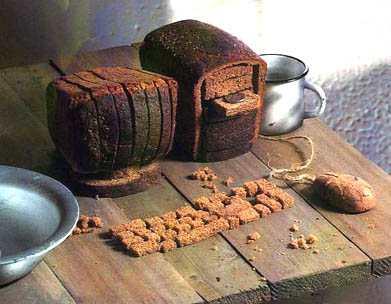
Teacher: Look at this funny bread computer. It looks like a real one, but some of the devices are not in the picture. Which devices could you add to the computer? (printer, scanner, speakers)
Which input devices can you see in the picture? (floppy disk drive, disc drive, keyboard, mouse)
Are some of them absent?
Which output devices can you see in the picture? (monitor/screen)
Which output devices are not in the picture? (printer, speakers)
What hardware can you remember?
8. Подведение итогов урока, оценка работы студентов и домашнее задание - 2 минуты.
Teacher: You’ve worked very well today, and the definition game winners have honestly deserved their fives. A, B, and C also get fives...
It’s all for today and your homework for our next class is to write a composition using the words:
to surf
over the Internet
floppy disk
roses
football
printer
Приложения
Приложение 1
Betty Botter bought some butter.
“But”, - she said, -“The butter’s bitter!
But a bit of better butter
Will make my batter better!”
So, she bought some better butter
And it made her batter better.
So, it was better.
Betty Botter bought a bit of better buter.
Приложение 2
WHAT IS A COMPUTER
1.
A computer is a machine that stores programs and information in electronic form and can be used for a variety of processes, for example writing, calculating, and communicating on the Internet. The machine is capable of storing and manipulating numbers, letters and characters.
The basic idea of a computer is that we can make the machine do what we want by inputting signals. The main job of computers is the processing of information.
Computers have three basic capabilities. First, computers have circuits1 for performing arithmetic operations such as: addition, subtraction, division, multiplication and exponentiation.
Second, computers have a means of communicating with the users.
After all, if we couldn’t feed information in and get results back, these machines wouldn’t be of much use.
The computer’s input device (which might be a disk drive or tape drive depending on the medium used in inputting information) reads the information into the computer. For outputting information, two common devices used are a printer which prints the new information on paper or a monitor which shows the result.
Third, computers have circuits which can make decisions.
The kinds of decisions which computer can make are not of the type: “Who would win a war between two countries?” or “Who is the richest person in the world?”
Unfortunately, the computer can only decide three things, namely: Is one number less than another? Are two numbers equal? and, Is one number greater than another? A computer can solve thousands of logical decisions quickly and without being tired or bored. A person can do the same job too, but in many cases that person would be dead long before the job was finished.
2.
Let’s take a look at the history of the computers that we know today.
The very first calculating devices were the ten fingers of a man’s hand and abacus2. During the 17th and 18th centuries people tried to find easy ways of calculating.
T he first real existed mechanical calculus device was "Pascaline", designed by the scientist Blez Pascal. It was 6 (or 8) digital cog-wheel3 device for
decimal numbers4 adding and subtraction (1642).
Pascaline
Then J. Napier, a Scotsman, devised a mechanical way of multiplying and dividing, which is how the modern slide rule5 works. The idea was, by the way, used by Henry Briggs so that he produced logarithm tables, which all mathematics use today. But the first real calculating machine appeared in 1820 as a result of experiments. This type of machines could save a great deal of time and reduce the possibility of making mistakes. Charles Babbage

But in 1830 Charles Babbage, an Englishman, designed a machine that was called “The Analytical Engine”. Charles Babbage made a qualitively new step in calculation devices development - changing from hand-made to automatic calculations according to designed program. The device was consisted of 5 units, namely arithmetic, storage, control, input and output, similar to first computers that appear 100 years later. An estimated calculations rate was 1 second for addition and subtraction and 1 minute for multiplication and division.
The machine was to operate by means of cog-wheels. The construction was an attempt to cut out the human being altogether (except for providing the machine necessary information about the problem to be solved). And some units of the device were created, but attempt to assemble the whole device failured because of its bulk6. It were required about 50.000 cog-wheels, to say nothing about the other. Babbage dreamed to put so bulky device to operation with the help of steam-engine7. This idea was realized by American scientist Howard Aiken, who create first relay-mechanical device in 1944.
This device was the first machine that could figure out long lists of mathematical problems all at a very fast rate. So, Mark I (the name given to the machine) was the first digital computer.
-After Mark I there were constructed other digital devices: ENIAC, the first digital computer using vacuum tubes8, and so on. The computers which used vacuum tubes came out in 1950, and it was the first generation of computers.
- But by 1960 the second generation of computers was developed. These machines could perform work ten times faster than their predecessors. They were smaller, faster and more dependable than the first-generation computers. The reason for the extra speed was the use of transistors instead of vacuum-tubes.
- The third-generation computers appeared on the market in 1965. These were controlled not by transistors but by tiny integrated circuits9, which caused them to be smaller, even more dependable and quick. They were able to do a million calculations a second.
- The fourth-generation computers have been greatly reduced in size. Now the computers not only reduced from the huge size to the size on normal standart PC (personal computer). There are also the computers which can be placed on one’s lap (so called laptops or laptop computers) or on one’s palm (palmtop computers). And they can complete approximately 1000 000 instructions per second.
Vocabulary List
calculate (v) to discover a number or amount using mathematics.
device (n) a machine or piece of equipment that does a particular thing
disk drive (n) the part of a computer that reads information from a disk or records information onto a disk.
input (v) put information into a computer
laptop/ laptop computer (n) = notebook computer
output (v) produce information out of a computer, foe example by showing it on a screen or printing it.
palmtop computer (n) карманный компьютер
- a very small computer that you can old in your hand.
process (v) to organize information by means of a computer. = figure out
Приложение 3
Exercise 1.
Your task: True or false? Find the sentences that are not true and explain where is the fault.
1. The computer’s input device reads the information into the computer.
2. The third-generation computers were smaller, more dependable and quick for they were
controlled not by transistors but by tiny integrated circuits.
3. “The Analytical Engine” was a 6 (or 8) digital cog-wheel device designed by a scientist
Pascal Babbage in 1830.
4. The second generation of computers was developed by 1960.
5. The first real calculating machine appeared in 1820 as a result of experiments.
6. J. Napier devised a mechanical way of multiplying and dividing, using the idea of Henry Briggs, who produced logarithm tables, which all mathematics use today.
7. Laptops are small computers, but palmtop computers are smaller than laptops.
8. Computers can not calculate possible answer for the question “Who is the richest person in the world?”
9. The second-generation computers could work ten times faster than their predecessors because the use of cog-wheels instead of transistors.
10. Howard Aiken was an American scientist, who created first digital computer (Mark I) in 1944.
11. The computers which used vacuum tubes came out in 1970, and it was the third generation of computers.
12. The third-generation computers were able to do a million calculations a second.
13. “ABACUS” was the name of the first digital device using vacuum tubes.
14. The greatest existed mechanical calculus device was "Pascaline". Its constructon took Blez Pascal about 2 years for the device required about 50.000 cog-wheels.
15. Computers have circuits which can make decisions.
16. Mark I was the first king of Great Britain, who used a computer for ruling the state.
17. There were 6 generations of computers.
18. If we couldn’t feed information in and get results back, computers wouldn’t be of much use.
Приложение 4
CHAT (v)
-to exchange messages using a computer so that you can see each other’s messages immediately.
CHAT ROOM (n)
-the area on the internet where people can exchange messages.
CIRCUIT BOARD (n) плата
- a board in a piece of electronic equipment with electrical connections or computer chips in it
CLICK (v)
- when you press on a button on a mouse you click it.
COMPUTER (n) компьютер
- a machine that stores programs and information in electronic form and can be used for a variety of processes, for example writing, calculating, and communicating on the Internet:
All our computers are linked to a main network.
(computer-aided design/CAD10, computer game, computer graphics, computer modeling11, computerise/computerize12...)
DEVICE (n) a machine or piece of equipment that does a particular thing
DISC (n) диск
-a computer disk
-a CD (compact disc).
(CD-R - (CD recordable) an empty CD you can use to record information from your computer.
CD-ROM - (CD read-only memory) a CD that stores large amounts of information for use by computer. ПЗУ, постоянно запоминающее устройство.
CD-RW - (CD rewritable) a CD you may use as many times as you want to record music or information.
CD writer - a piece of equipment used to record information onto CDs)
DISK DRIVE (n) дисковод
- the part of a computer that reads information from a disk or records information onto a disk.
(floppy disk drive, CD-ROM/DVD-ROM drive...)
E-MAIL (n)
- a system for sending messages from one computer to another.
(e-mail address, e-mail attachment13)
E-MAIL (v)
-to send something by e-mail.
FLOPPY DISK/ FLOPPY/ DISK/ DISKETTE (n) дискета
- a small plastic square object that you use to copy information from a computer
HACK (v)
-to use a computer to connect to someone else’s computer secretly or illegally.
HACKER (n)
-someone who uses a computer to connect to other people’s computers secretly and often illegally, so that they can find or change information
HARD DISK (n) жесткий диск
- a part inside a computer tat stores the information it needs to work.
HARDWARE (n) технические средства («железо»)
-computer equipment.
ICON (n)
- a small picture on a computer screen that you choose by pressing a button with your mouse in order to open a particular file or a program.
INPUT (v)
- put information into a computer
THE INTERNET/ THE NET (n) интернет
-a computer system that allows people in different parts of the world to exchange information. You can use the Internet to visit websites and to send and receive messages by e-mail.
(internet café14, ISP15,)
!!! on the internet - to post something on the internet.
over the internet - to send something over the internet.
KEY (n)
- one of the parts that you press on a keyboard to make it produce letters, numbers etc.
Press any key.
KEYBOARD (n)
- a piece of computer equipment with keys on it, used for putting information into a computer.
LAPTOP (n)=NOTEBOOK (COMPUTER) ноутбук
-a small computer you can carry with you.
MODEM (n) модем
- a piece of equipment that allows you to connect a computer to a telephone line.
MOTHERBOARD (n) системная/ материнская плата (=main board, system board)
-the main circuit board in a computer.
MOUSE (n)
-a small object that you move in order to do things on a computer screen.
(mouse mat16)
OUTPUT (v)
- produce information out of a computer, for example by showing it on a screen or printing it.
PALMTOP COMPUTER (n) карманный компьютер
- a very small computer that you can old in your hand.
PRINTER (n)
- a piece of equipment you use to print documents you have created on a computer
(a laser/ inkjet/ color printer)
PROCESSOR (n)
- a part of computer that controls and performs all the operations.
The computer has a processor speed of 450 MHz17
(central processor unit/ CPU)
SCAN (v) сканировать
- to use a piece of equipment to read and store information in digital18 form.
-if a piece of equipment scans a document, photograph etc it changes it into a form that can be stored in a computer.
The device can fax, scan and copy.
SCANNER (n) сканер
- a piece of equipment used for copying a picture or a document into a computer.
SCREEN (n) = MONITOR
-a flat surface on a computer, TV etc where words and pictures are shown
SOFTWARE (n) программное обеспечение
- the programmes used by computers for doing particular jobs.
(anti-virus software)
SPEAKER (n) колонка
- a peace of equipment that sends out the sound from a CD-player.
SURF (v)
- to look at various places one after another on the Internet.
She spends hours every day just surfing the Net.
VIRUS (n) вирус
-a program that enters your computer and damages or destroys information you have stored
Most viruses are spread over the Internet.
(e.g.: Trojan horse...)
THE WEB (n)
- the World Wide Web (www)
(web designer, web browser19, webcam20, webcast, web traffic21)
Приложение 5
| (noun) -a computer system that allows people in different parts of the world to exchange information. | (verb) -to exchange messages using a computer so that you can see each other’s messages immediately | |
| (noun) - one of the parts that you press on a keyboard to make it produce letters, numbers etc. | (noun) -the area on the internet where people can exchange messages so that they can see each other’s messages immediately | |
| (noun) - a piece of computer equipement with keys on it, used for putting information into a computer. | (noun) -a board in a piece of electronic equipment with electrical connections or computer chips in it | |
| (noun) -a small computer you can carry with you. | (verb)
- to press on a button on a mouse | |
| (noun) - a piece of equipment that allows you to connect a computer to a telephone line | (noun) - a machine that stores programs and information in electronic form and can be used for a variety of processes, for example writing, calculating, and communicating on the Internet | |
| (noun) -the main circuit board in a computer | (noun) -a machine or piece of equipment that does a particular thing | |
| (noun) -a small object that you move in order to do things on a computer screen | (noun) -a computer disk -a CD | |
| (verb) - produce information out of a computer, for example by showing it on a screen or printing it | (noun) - the part of a computer that reads information from a disk or records information onto a disk. | |
| (noun) - a very small computer that you can old in your hand | (noun) - a system for sending messages from one computer to another. | |
| (noun) - a piece of equipement you use to print documents you have created on a computer
| (verb) -to send something from one computer to another | |
| (noun) - a part of computer that controlls and performs all the operations | (noun) - a small plastic square object that you use to copy information from a computer | |
| (verb) - to use a piece of equipment to read and store information in digital form - to change a document, photograph etc it into a form that can be stored in a computer | (verb) -to use a computer to connect to someone else’s computer secretly and often illegally | |
| (noun) - a piece of equipment used for copiing a picture or a document into a computer | (noun) -someone who uses a computer to connect to other people’s computers secretly andofen illegally, so that they can find or change information | |
| (noun) -a flat surface on a computer, TV etc where words and pictures are shown | (noun) - a part inside a computer that stores the information it needs to work. | |
| (noun) - the programmes used by computers for doing particular jobs | (noun) -computer equipment. | |
| (noun) -unwanted advertisments or other material sent to large numbers of people by e-mail from companies | (noun) - a small picture on a computer screen that you choose by pressing a button with your mouse in order to open a particular file or a program. | |
| (noun) - a peace of equipment that sends out the sound from a computer or a CD-player | (verb) -if a computer virus does it to a computer or a computer program it means that a virus enteres it and causes problems. | |
| (verb) - to look at various places one after another on the Internet | (verb) - put information into a computer | |
| (noun) -a program that enters your computer and damages or destroys informartiom you have stored |
| |
| (noun) - a place on the internet where unformation is available about a particular subject etc
|
| |
Приложение 6
Exercise 2. Add another word, abbreviations or part of a word, to completecommon ‘computer’ words and phrases.
| 1. soft_______ 2. a world _______ ______ 3. floppy _______ 4. hard__________ 5. ________ drive 6. key__________ 7. ________-ROM 8._________-mail 9. lap___________ | 10. _______ room 11. hard _________ 12. ____________put 13. circuit ________ 14. mother_________ 15. _______book 16. in__________ 17. on/over the _______ 18. palmtop ____________ |
Приложение 7
1 circuit - зд. схема
2 abacus = counting frame - счёты
3 cog-wheel/ cog - шестерёнка
4 decimal numbers - десятеричные числа
5 slide rule - логарифмическая линейка
6 bulk - объём
7 steam-engine - паровой двигатель
8 vacuum tube - вакуумная лампа
9 integrated circuit - интегральная схема
10 the use of computers to design things such as vehicles and buildings.
11 the use of computer images to help you improve the design of something, solve a problem etc.
12 in American English.
13 something you send with a letter. (приложение)
14 a café where people can pay to use the internet, send e-mails etc.
15 Internet Service Provider: a company that provides connection to the Internet.
16 a piece of soft material that you move a computer mouse around on.
17 megahertz.
18 digital: storing information such as pictures or sounds as numbers or electronic symbols. (versus analogue)
19 a software programme used for finding and looking at pages on the internet.
20 a camera connected to a computer that produces images that can be seen on a website
broadcast on the internet/ to webcast.
21 the number of people visiting a particular website.
Вебинар для учителей
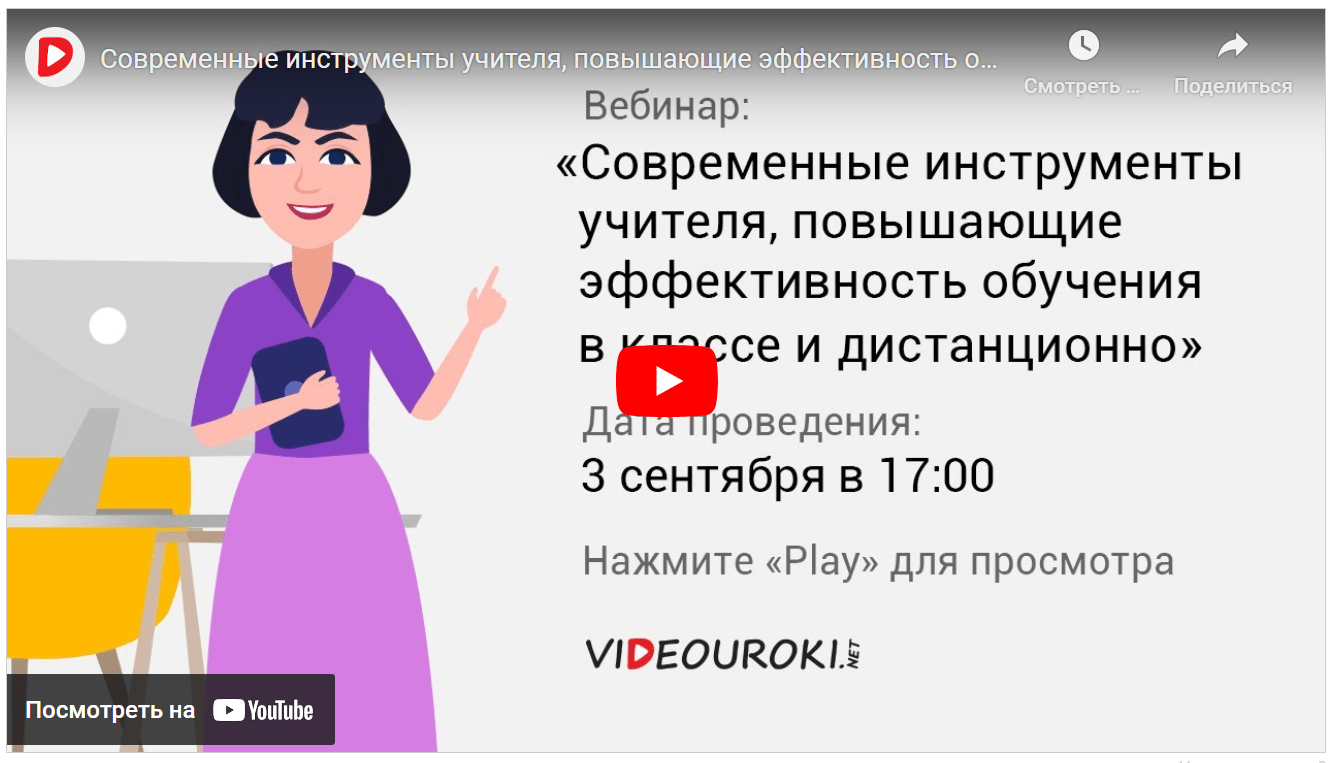
🎓 Свидетельство об участии ✨БЕСПЛАТНО!✨